
A practical guide to every content monetization option available through Riddle’s quiz maker – ranked from easiest to most advanced.
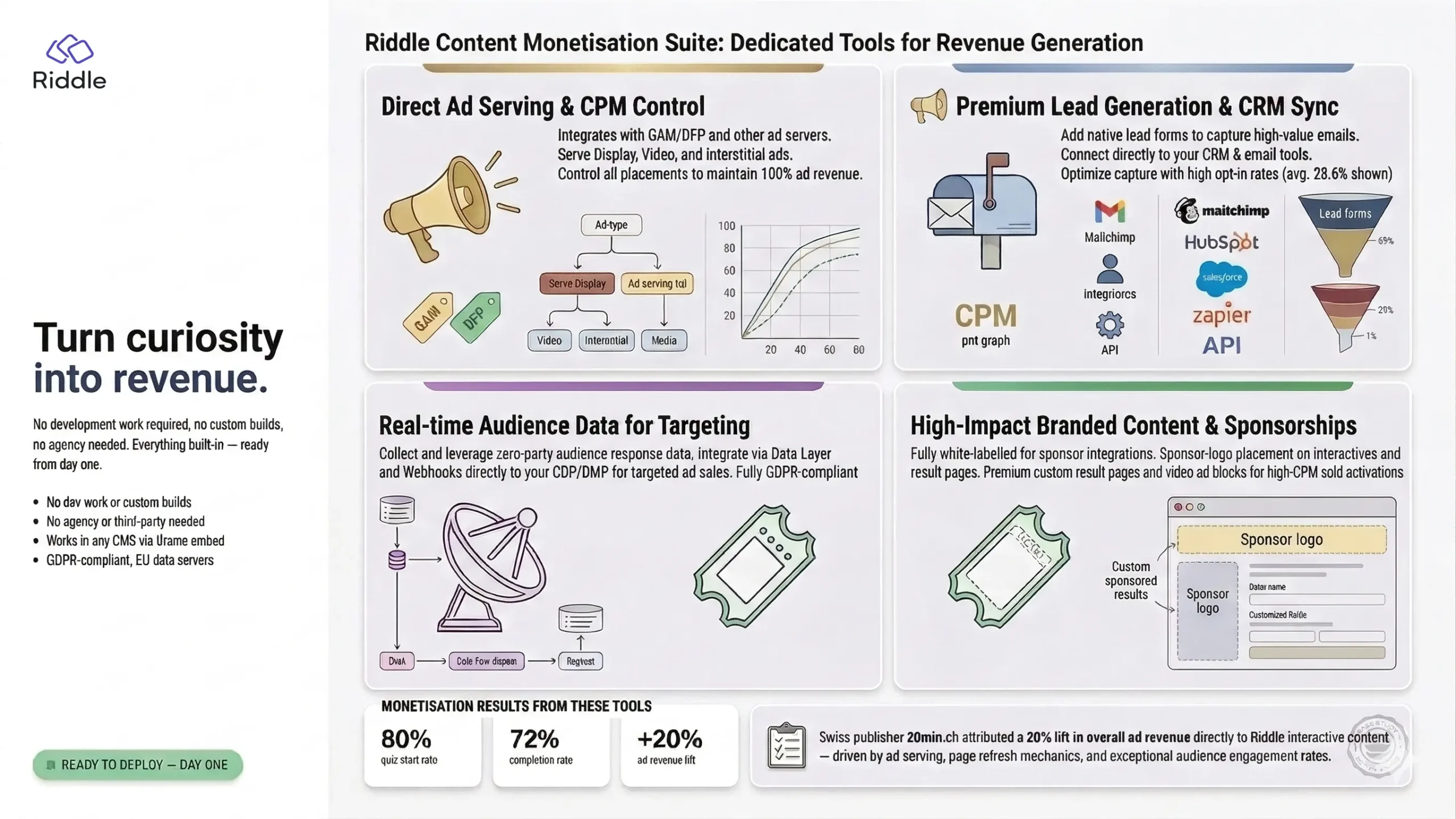
Riddle gives publishers, media companies, and brands full, direct access to a complete suite of content monetization tools – no development work required, no custom builds, no agency needed. Everything from ad serving and lead generation to sponsored content and audience data collection is built into the platform, ready to deploy from day one.
Content Monetization Features Included with Riddle
Every content monetization feature described in this playbook is included with Riddle:
| Feature | What it means for your organisation |
| Intuitive drag-and-drop creator | Build quizzes, polls, personality tests, score predictors and more — no coding, no developer needed. |
| Team workspaces & style templates | Create branded templates once; every team member auto-gets correct fonts, colours, logos, and pre-configured ad slots. |
| Built-in ad block & ad serving | Set up your GAM/DFP ad tags to serve your own ads inside Riddles as interstitial video/display ads — plus options to display above and below each Riddle. |
| Lead generation forms | Add email/data capture to any interactive in minutes. Connect directly to your CRM, MailChimp, HubSpot, or any tool via native integration, API, webhook, or Zapier. |
| Data layer & webhook integration | Pass audience response data to your CDP, DMP, or data warehouse in real time — fully GDPR-compliant. |
| Sponsored/branded content tools | Full white-labelling, sponsor logo placement, custom result pages, and video ad blocks — everything needed for sold activations. |
| Embed anywhere | Standard iframe embed works in any CMS (Sitecore, WordPress, Drupal, AEM, etc.) — paste the code, done. |
| AI quiz generator | Enter a topic or URL and Riddle generates a complete interactive in seconds — speeds up editorial and commercial content production. |
| Fully automated contests | Schedule open/close dates, collect entries, pick a winner based on your conditions, and send winner and non-winner emails automatically — no manual steps after setup. Non-winner emails (e.g. a sponsor discount code) convert well because entrants have already declared interest in the prize. |
Riddle’s team is available for content monetization strategy sessions, best practice reviews, and onboarding support — but the platform is designed so teams can move independently and at pace from day one.
5 Content Monetization Strategies at a Glance
Five strategies ranked from easiest to most advanced:
| # | Option | Difficulty | Time to Launch | Revenue Model |
| 1 | Ad serving inside Riddles — display, video & interstitials + project presets | Easy | Same day | CPM / display / video |
| 2 | Page ad refresh on embed pages | Easy | 1–2 days | CPM impression uplift |
| 3 | Data collection & audience segmentation | Medium | 1–2 weeks | First-party audience value |
| 4 | Lead generation & CRM integration | Medium | 1–2 weeks | CPL / subscriber acquisition |
| 5 | Fully sponsored / branded activations | Advanced | 3–4 weeks | Sponsorship / branded content fee |
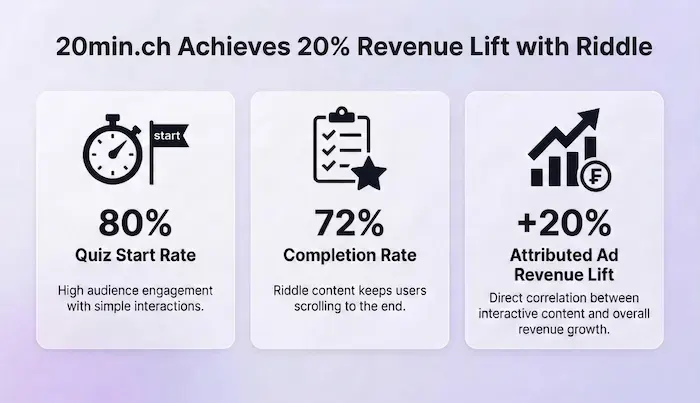
Key Stat: Swiss publisher 20min.ch reported an 80% quiz start rate, 72% completion rate, and a 20% lift in overall ad revenue — attributed directly to Riddle interactive content.
Download the Content Monetization Whitepaper
You can download the free whitepaper by filling out this form:
Enter your email above and get the full whitepaper to share with your team or use in your next presentation.
Content Monetization Strategy Breakdowns
1. Ad Serving Inside Riddles — Display, Video & Interstitials + Project Presets (Easy)
⏱ Launch Timeline: Same day — everything is included and ready to activate
💰 Revenue Model: CPM revenue from programmatic or direct display and video ads — you keep 100%
This is the recommended starting point for content monetization with Riddle — and the fastest path to revenue. Riddle’s built-in ad block lets you insert ad units at any point inside any interactive — above or below the Riddle, between questions, or as a full-attention interstitial before the results screen. You choose the placement, format, and timing.
All ads are served directly from your own GAM/DFP setup. Riddle never runs its own ads inside your content. Ad formats supported include standard IAB display banners (300×250, 728×90, etc.), video ads (MP4 or VAST via iframe), and full-screen interstitials.
The interstitial placement — after the last question, just before results — is particularly powerful: users have spent 3–5 minutes answering questions and are highly motivated to see their result. 20min.ch reported 80% of readers starting quizzes and 72% completing them, delivering exceptional ad viewability and completion rates. For video interstitials, Riddle lets you configure a delayed skip button — so you can guarantee a minimum viewing window and protect eCPM, while still giving users an exit if they want one. A practical balance between revenue and reader experience.
The key to scaling this efficiently is combining two features: Project Presets and saved templates — they work at different levels and are stronger together.
Project Presets store your styles and settings at the project level — fonts, colours, CSS, logo, and your configured ad slots for above and below the embed. Set these up once and every Riddle created in that project automatically inherits the correct branding and surrounding ad inventory.
Templates go a step further: they save the full structure of a specific content type, including any in-quiz Ad Blocks. A practical example — create a “Weekly Quiz” template with 8 questions, 3 result types, and an interstitial Ad Block already positioned before the results screen, pointing to your existing ad slots. Any team member opens the template, swaps in the week’s questions, and publishes — with the interstitial correctly configured and live. No setup, no forgotten ad blocks, no inconsistency across your output.
How to Do This in Riddle
- In your Riddle account, go to Project Settings → Ads tab and paste in your GAM/DFP ad tag. Create up to 5 reusable ad slots per project, with variable support so creators can customise targeting parameters per-Riddle.
- In the Riddle creator, add an Ad Block at the desired position. Options: above/below the Riddle (banner), between questions (display or video), or after the last question before results (interstitial/video — highest attention placement).
- For video ads: add an MP4 URL or VAST tag via iframe. Enable a skip ad button delay to guarantee a minimum view duration and protect eCPM — Riddle lets you set the delay in seconds, so you can tune it to match your UX tolerance.
- For programmatic: your existing GAM line items serve into the Riddle placement exactly as they do for all other inventory. Consider a dedicated GAM ad unit for the Riddle interstitial slot to enable separate floor pricing.
- Set up a Project Preset for your editorial project — configure your brand styles, CSS, and the ad slots you want to appear above and below each embed. This takes around 20 minutes once and applies automatically to every Riddle created in that project.
- For recurring content formats, create a saved template — for example, a “Weekly Quiz” template with 8 questions, 3 result types, and an interstitial Ad Block already placed before the results screen and pointing to your existing ad slots. Team members open the template, update the questions, and publish. The monetization setup is already done.
- Tip: Use Riddle’s AI quiz generator to spin up topical content fast — enter a headline or URL and get a complete interactive in seconds, ready to publish and start generating content monetization revenue.
📚 Resources & Help Docs
- Help: How to add an ad block to your Riddle
- Blog: How to show video ads in your Riddles — step-by-step guide
- Blog: Monetise your quizzes with in-quiz ads (with GAM/DFP walkthrough)
- Blog: All monetization options overview including sponsored quizzes
- Help: Project presets (auto-apply your styles and branding)
- Case study: 20min.ch — 20% lift in ad revenue by using quizzes
2. Surrounding Page Ad Refresh on Embed Pages (Easy)
⏱ Launch Timeline: 1–2 days (one-time setup by your ad tech team)
💰 Revenue Model: Additional CPM impressions on your existing inventory — no new ad products needed
When a reader engages with a Riddle on one of your pages, they stay far longer than average — which is a powerful but often overlooked content monetization lever. Riddle can fire a JavaScript event each time a reader progresses through the interactive — for example, on each quiz answer, at the halfway point, or on the results screen.
Your existing ad tech setup listens for these events and triggers a refresh of the surrounding ad slots (header, sidebar, in-content). The result is more impressions from inventory you already have, with no changes to the ad products themselves. 20min.ch reported a 20% lift in ad revenue using this mechanic.
How to Do This in Riddle
- Riddle fires a standard JavaScript postMessage event at configurable trigger points. Your ad tech team adds a listener for this event on your page.
- The listener triggers your existing GAM/DFP slot refresh logic — the same mechanism already used for standard ad refreshes on your pages.
- Configure trigger frequency in your Riddle project settings to balance impression volume with user experience. Every question answered is the most common setup.
- No changes to ad products, line items, or creative are required. This works with all existing programmatic and direct campaigns.
- Once set up on one Riddle embed, the same page-side listener works for all Riddle embeds across your properties automatically.
📚 Resources & Help Docs
- Blog: Refresh ads on your page — how it works
- Blog: Content automation for publishers (includes ad refresh case study)
- Riddle for publishers — full overview
3. Data Collection & Audience Segmentation (Medium)
⏱ Launch Timeline: 1–2 weeks to set up integrations and define segments
💰 Revenue Model: Richer first-party audience data; premium targeted inventory; subscriber insights
Every Riddle interaction is a declared data point from a genuinely engaged user — and first-party data is one of the most valuable content monetization assets a publisher or brand can build. Quiz answers, poll responses, and personality results reveal real preferences, interests, and intent — far more reliably than inferred behavioural data.
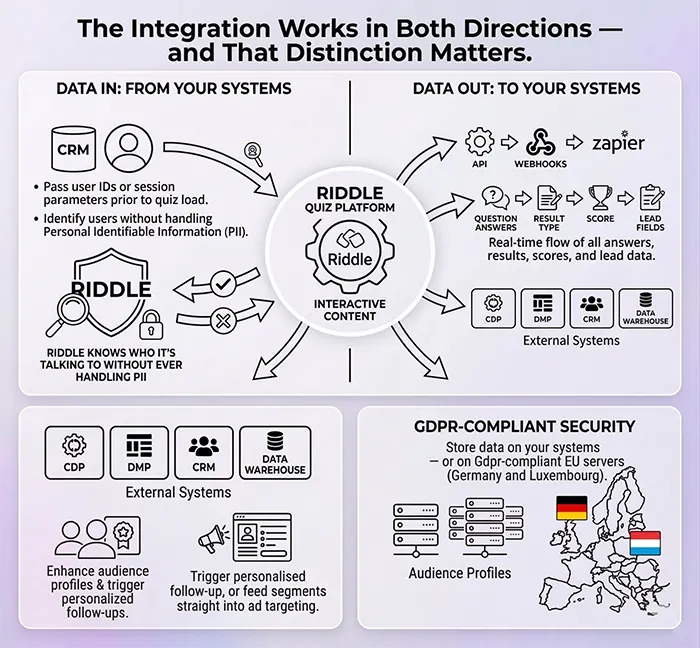
The integration works in both directions. The Data Layer sends data into Riddle from your systems — your login platform, CRM, or tracking setup passes in a user ID, session data, or parameters before the interactive loads, so Riddle knows who it’s talking to without handling PII directly. On the way back out, Riddle’s API, webhooks, Zapier, and native integrations push all quiz response data to your systems in real time — every answer, result type, score, and lead field flows directly into your CDP, DMP, or data warehouse. You can match declared quiz signals to existing audience profiles, trigger personalised follow-up, or feed segments straight into your ad targeting.
Examples: a sports quiz identifies fans by team or league; a news poll surfaces attitudes on a political topic; a lifestyle personality test reveals travel intent or purchase interest. These segments can power premium programmatic deals, direct advertiser packages, and editorial personalisation — making audience data one of the richest content monetization returns available from interactive formats.
How to Do This in Riddle
- Identify the 3–5 audience segments most valuable to your advertiser base. Design Riddle content (quizzes, polls, personality tests) that naturally surfaces those signals without feeling like a survey.
- In Riddle’s Publish step, go to ‘Save and Connect Data’ to configure your data-out connections — webhook endpoint, native integration, Zapier, or API. Riddle sends all response data back to your systems in real time: individual question answers, result type, score, and any lead form fields.
- For anonymous data (no PII): use Riddle’s Data Layer to pass your anonymous user ID as a URL variable. Riddle stores this ID alongside quiz responses for joining to user profiles in your own warehouse.
- For named/logged-in users: Riddle’s lead form can pass email or user ID directly to your CRM or CDP alongside quiz responses, with consent checkboxes configured in the Riddle form settings.
- Riddle stores all data on GDPR-compliant EU servers (Germany and Luxembourg).
📚 Resources & Help Docs
- Blog: Collect rich first-party data with Riddle’s Data Layer
- Help: Intro to lead generation and data collection
- Help docs: All lead generation and data collection guides
- Riddle for publishers — data and segmentation overview
4. Lead Generation & CRM Integration (Medium)
⏱ Launch Timeline: 1–2 weeks to configure forms, consent, and CRM connection
💰 Revenue Model: Subscriber acquisition; advertiser CPL deals; newsletter list growth
Lead generation is one of the highest-converting content monetization tactics available — and Riddle’s built-in lead generation forms are among the most effective capture tools because users are intrinsically motivated to complete them: they want to see their quiz result. Riddle reports average opt-in rates of 28.6%, compared to under 3% for standard pop-ups.
Publishers can use this for subscriber and newsletter growth, or offer it as a premium content monetization add-on to advertisers at a cost-per-lead (CPL) rate. Brands can drive first-party database growth directly from engaging content. The form can be placed at the start, middle, or end of any Riddle — end-gating before results is the most effective placement.
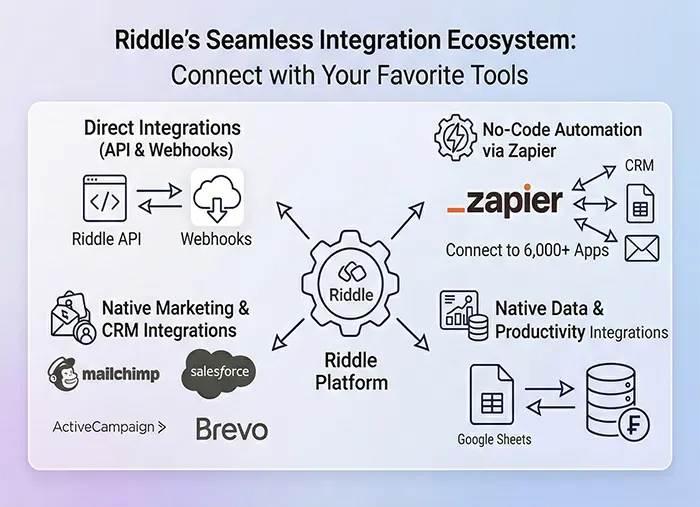
On the data-out side, Riddle connects natively to HubSpot, Salesforce, MailChimp, ActiveCampaign, and most major CRM and email platforms — sending back not just name and email, but the full quiz response data alongside each lead record. Anything not natively supported connects via Zapier, webhook, or Riddle’s API.
How to Do This in Riddle
- In the Riddle creator, go to the ‘Create’ step and add a lead form block. Choose which fields to collect (name, email, phone, custom fields) and where to place the form in the interactive flow.
- Configure consent checkboxes to match your privacy requirements and any advertiser consent needs. Double opt-in (DOI) confirmation email is available if required.
- In the ‘Save and Connect’ tab, select your CRM or email platform from the native integration list (Salesforce, MailChimp, ActiveCampaign, and many others) and map Riddle form fields to your CRM fields. Or connect to any system using Zapier, webhook, or Riddle’s API.
- Riddle passes rich data to the CRM — not just name/email, but also the user’s quiz result, individual question answers, and score, enabling immediate personalised follow-up.
- For advertiser CPL deals: brief your ad sales team with a rate card for ‘lead generation activation’. Form fields, consent language, and data destination are all configurable per-campaign.
📚 Resources & Help Docs
- Help: Lead generation complete guide with video tutorials
- Help: Intro to lead generation — all field types and options
- Blog: All lead gen and monetization options overview
- Zapier app: connect to 8,000+ software tools (no coding required)
- API: send Riddle stats, leads, and other info
5. Fully Sponsored / Branded Activations (Advanced)
⏱ Launch Timeline: 3–4 weeks (scoping, content creation, brand approval, launch)
💰 Revenue Model: Sponsorship fees / branded content packages; CPE pricing
The highest-value content monetization option in the Riddle toolkit. A fully branded activation is a custom interactive content experience built around an advertiser’s campaign — themed, skinned, and delivered entirely within the sponsor’s creative direction.
Examples: a car brand sponsoring a ‘Which car suits your lifestyle?’ personality quiz; a bank sponsoring a ‘How financially fit are you?’ assessment; a retailer sponsoring a seasonal gifting recommender.
Ad sales teams can sell these as premium branded content monetization packages. Everything needed to build and deliver these activations is included with Riddle. Your content or commercial team builds directly in Riddle — the sponsor’s logo, brand colours, custom fonts, and video ads are all configured through Riddle’s customisation tools. No external build required.
Contests are worth calling out separately as a sponsored activation format — and Riddle automates the whole thing. Riddle handles the entire contest lifecycle end to end: scheduling open and close dates, collecting entries, picking a winner based on your defined conditions, and automatically sending winner and non-winner emails — no manual intervention required after setup.
The non-winner email is the mechanic that tends to resonate most with sponsors. Anyone who entered a contest for a prize has already told you they want it.
A sponsor email to non-winners — “you didn’t win, but here’s 20% off” — lands with a highly motivated audience. They’ve already shown buying intent by entering; the discount converts at a rate a standard email campaign can’t match. For ad sales teams, it changes what you’re selling: a sponsored contest isn’t just a brand awareness play, it’s a measurable acquisition pipeline with automated post-contest email flows built in. That’s a stronger commercial proposition — and a stronger reason for sponsors to renew.
How to Do This in Riddle
- Create a dedicated Riddle project (a shared workspace) for each advertiser or campaign category (e.g. ‘Commercial — Auto’, ‘Commercial — Finance’). This keeps sponsored content separate from editorial and allows tailored branding templates per advertiser.
- Build a Project Preset in the sponsor’s branding: upload their logo, set their hex colours and fonts (Google Fonts and custom font upload supported), configure their ad slots or video block. Save as the default for this workspace.
- Build the interactive in Riddle’s creator. All question types, result pages, lead forms, and ad blocks are available.
- For lead collection as part of the activation: configure the lead form with advertiser-specific consent language and map data to the advertiser’s CRM (or yours, per the commercial agreement).
- Publish and embed on the relevant property. Riddle’s Stats dashboard gives real-time performance data (completions, leads, shares, time spent) — shareable with the advertiser as a campaign report.
- For recurring or seasonal sponsors, save the branded template and duplicate it for the next campaign. The second activation takes a fraction of the time to build.
📚 Resources & Help Docs
- Blog: Monetise your traffic with sponsored quizzes — complete guide
- Blog: Enterprise-grade quiz maker for publishers — full feature list
- Help: Project presets (for per-advertiser branding workspaces)
- Riddle for publishers — all monetization features
Your Content Monetization Launch Sequence
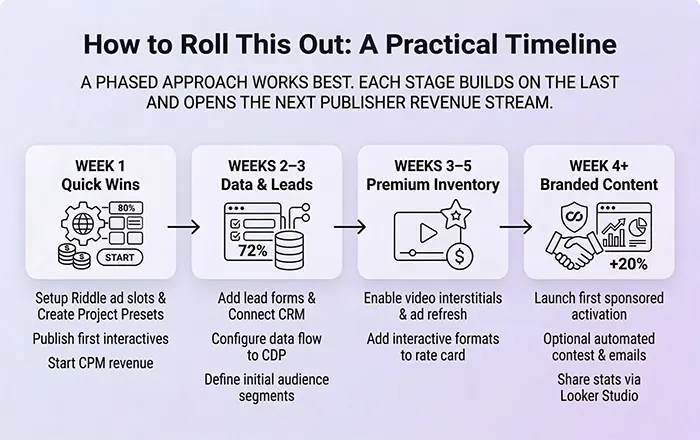
A phased rollout works best — each phase activates a new content monetization revenue stream while building the foundation for the next:
| Phase | Timeframe | What to do |
| Phase 1: Quick wins | Week 1 | Set up project ad slots in Riddle. Create 2–3 branded project presets with ad blocks pre-configured. Build first quizzes, embed on high-traffic pages, begin generating CPM revenue immediately. |
| Phase 2: Audience & leads | Weeks 2–3 | Add lead forms to existing templates. Connect to your CRM. Configure API, webhook, and/or Data Layer integration to flow response data to/from your CDP/DMP. Define first audience segments. |
| Phase 3: Premium inventory | Weeks 3–5 | Enable video interstitial placements in key templates. Set up page ad refresh with your ad tech team. Brief ad sales team and add Riddle formats to the rate card. |
| Phase 4: Branded content | Week 4+ | Create first advertiser workspace and Project Preset. Build and launch first sponsored activation — optionally with an automated contest, including follow-up emails to the winner and discount-code emails to non-winners to drive sales. Generate campaign report from Riddle’s Stats dashboard. |
Getting Started with Riddle
Riddle is designed so your team can build and run all of the above content monetization strategies independently from day one. And the Riddle team is always on hand:
- Strategy & best practice sessions — reach out to your Riddle account contact to book a session on any of the above options.
- In-platform support — Riddle’s support chat is staffed by the Riddle team (including co-founders) and responds very quickly. Available at riddle.com.
- Help centre — comprehensive documentation, video walkthroughs, and step-by-step guides at riddle.com/help.
- Video course — free video tutorials and master classes on creating and monetizing interactive content at riddle.com/academy.
- Publisher resources — case studies, use cases, and feature guides specifically for publisher teams at riddle.com/solutions/for-publishers.
Download the Content Monetization Whitepaper
You can download the free whitepaper by filling out this form:
Enter your email above and get the full whitepaper to share with your team or use in your next presentation.
Ready to Start Monetizing Your Content?
Start your 14-day free trial with Riddle today.
FAQ About Content Monetization with Riddle
What is content monetization?
Content monetization is the process of generating revenue directly from digital content — turning articles, quizzes, polls, and interactive formats into income-producing assets. For publishers and media companies, this typically means combining several complementary revenue streams: ad serving inside or around content, lead generation, first-party data collection, and fully sponsored or branded activations.
The most effective content monetization strategies go beyond standard display advertising. Interactive content — such as quizzes and personality tests — creates extended dwell time, high completion rates, and declared audience data that commands premium CPMs and unlocks new commercial packages.
What are the most effective content monetization strategies for publishers?
The five most effective content monetization strategies for publishers — ranked from easiest to most advanced — are: (1) ad serving inside interactive content with display, video, and interstitials; (2) page ad refresh triggered by audience engagement events; (3) first-party data collection and audience segmentation; (4) lead generation and CRM integration; and (5) fully sponsored and branded content activations.
These strategies work best in combination. Ad serving and page refresh can go live on the same day with minimal setup. Data collection and lead generation add audience value over weeks. Sponsored activations deliver the highest per-campaign revenue but require the most lead time — typically three to four weeks from brief to launch.
How does interactive content improve content monetization performance?
Interactive content — quizzes, polls, personality tests, and score predictors — drives significantly higher engagement than passive formats. Users actively participate, spending three to five minutes working through questions, which creates longer dwell times, more ad impressions, and higher viewability scores. Swiss publisher 20min.ch reported an 80% quiz start rate and 72% completion rate using Riddle interactive content.
That engagement directly improves content monetization outcomes across multiple revenue streams: more impressions from page ad refresh, higher-attention interstitial placements before the results screen, richer first-party audience data from declared responses, and a naturally motivated lead capture moment — all from a single piece of content.
What role does zero- and first-party data play in content monetization?
First-party data — especially zero-party data declared directly by users — is one of the most valuable assets in a modern content monetization strategy. Unlike inferred behavioural data, quiz and poll responses reveal genuine preferences, interests, and purchase intent. A sports quiz identifies team allegiances; a lifestyle personality test surfaces travel or retail intent; a financial assessment reveals investment behaviour.
Publishers can use these audience segments to power premium programmatic deals, build direct advertiser packages around specific audience profiles, and personalise editorial content. With third-party cookies increasingly deprecated, declared first-party data collected through interactive content is becoming a primary content monetization differentiator for publishers.
What does a fully sponsored content monetization activation with Riddle involve?
A fully sponsored content monetization activation is a custom interactive experience built around an advertiser’s campaign — themed, branded, and delivered within the sponsor’s creative direction. Examples include a car brand sponsoring a ‘Which car suits your lifestyle?’ personality quiz, a bank sponsoring a financial health assessment, or a retailer sponsoring a seasonal gift recommender.
Everything required to build and deliver these activations is included in Riddle: sponsor logo placement, custom brand colours and fonts, video ad blocks, lead capture forms with advertiser-specific consent language, and a real-time stats dashboard for campaign reporting. No external agency or development work is required. Ad sales teams can package these as premium branded content monetization products with sponsorship fees or cost-per-engagement (CPE) pricing.
Does content monetization with interactive content require development work?
No. Publishers, media companies, and brands can build and run every content monetization strategy described in this playbook using Riddle’s quiz maker without any development work, custom builds, or agency involvement. The drag-and-drop creator, built-in ad serving, lead generation forms, data layer integrations, and branded content tools are all included and ready to use from day one.
Embedding Riddle content into any CMS — including Sitecore, WordPress, Drupal, and Adobe Experience Manager — requires only a standard iframe paste. The one exception is the page ad refresh mechanic, which requires a one-time JavaScript listener setup by your ad tech team — but no changes to ad products, line items, or creative are needed.