
Quizzes are brilliant traffic magnets – people love taking and sharing them. And when readers spend three to five minutes answering questions, you’ve got something most publishers would kill for: focused, sustained attention that’s perfect for advertising.
You can monetize quizzes with Riddle’s quiz maker (and keep 100% of the revenue) using our full set of in-quiz ad options – banner ads, video ads, refresh ads, and ad slots powered by your own ad server.
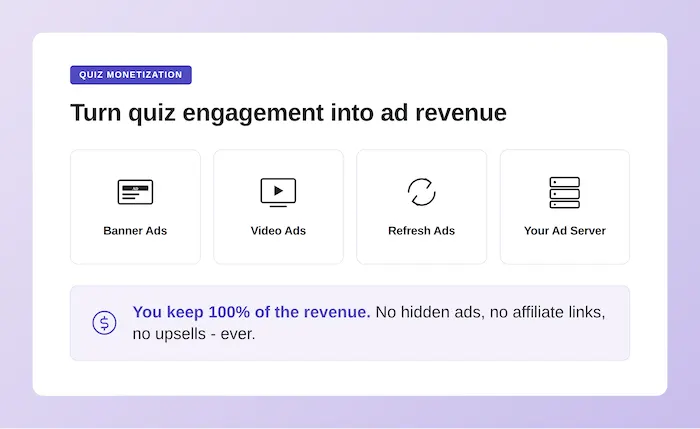
(Note: we never, ever run our own ads in your quizzes.)
That last point matters. Plenty of “free” quiz tools quietly stuff their own ads, affiliate links, and upsells into your content. We don’t – and we never will. Every cent of ad revenue your Riddles generate stays with you.
Why in-quiz ads work so well
Standard display ads on a typical article page get a few seconds of attention – if that. Readers scroll, scan, and bounce. Average session times on most publisher articles sit somewhere between 30 and 90 seconds.
Riddles flip this. A typical quiz takes 3 to 5 minutes to complete. Readers are actively engaged, clicking through questions, anticipating their results. That’s a level of focused attention that translates directly into ad performance:
- Higher viewability – ads stay in view because readers aren’t scrolling past them.
- Better engagement – users in “lean-forward” mode pay more attention to everything on screen, including ads.
- Multiple impressions per session – every question is a fresh opportunity to refresh the ads on the page.
- High completion rates on video ads – if readers have invested three minutes answering questions, they’ll happily watch a 15-second video to see their results.
Riddle’s in-quiz ad options
Video or banner ads before results
Use our ad/iFrame block to show a video ad before showing the quiz results. Anyone who has spent three to five minutes answering questions will very likely stick around to watch a video ad of 10 to 20 seconds in order to view their result.
- Highly engaged viewers with completion rates in the 95% range
- Serve your own video ads and keep 100% of all revenue
- You can also use this placement for regular banner ads instead of video
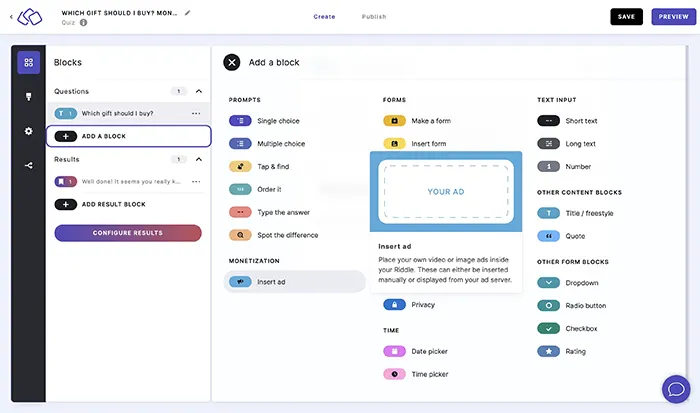
This is one of the highest-value placements you have available. The reader is fully committed at this point – they want their result – so video completion rates blow past anything you’ll see in a pre-roll on regular content.
Banner ads above and below your quiz
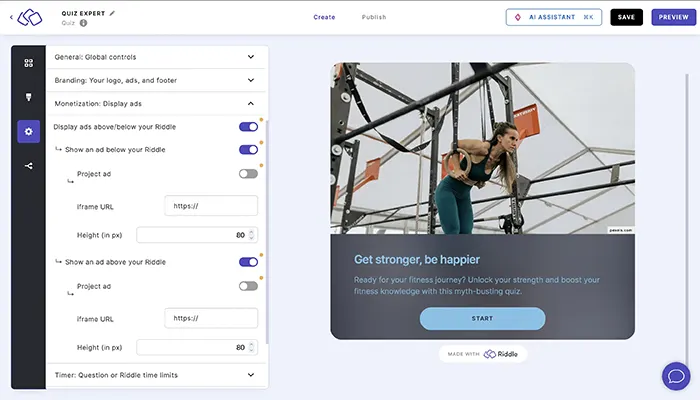
You can place banner ads above and below your quiz using either iFrames or ad slots from your ad server (more on both below). This works as a straightforward in-quiz placement that runs alongside the questions, picking up impressions throughout the entire quiz session.
This option requires our Enterprise Plan.
Refresh ads with every question
Most quizzes have 6 to 8 questions. You can set up your Riddle to refresh the surrounding ads on your page every X questions – generating multiple ad impressions from a single quiz session.
This is a quiet revenue multiplier that most publishers miss. An eight question quiz can produce three or four times the ad impressions of a static page, all while readers stay genuinely engaged with your content. Combine refresh ads with longer personality tests (10 to 15 questions) and the math gets very interesting very quickly.
Live example
The sample quiz embedded below includes video and banner interstitial ads in the question flow.
You can of course also use this placement to programmatically display ads from your ad server. All it takes is either an iFrame URL where Riddle can find these ads, or you can set up ad tags for your team in the project settings.
Insert ad placements to your Riddle quiz or other content
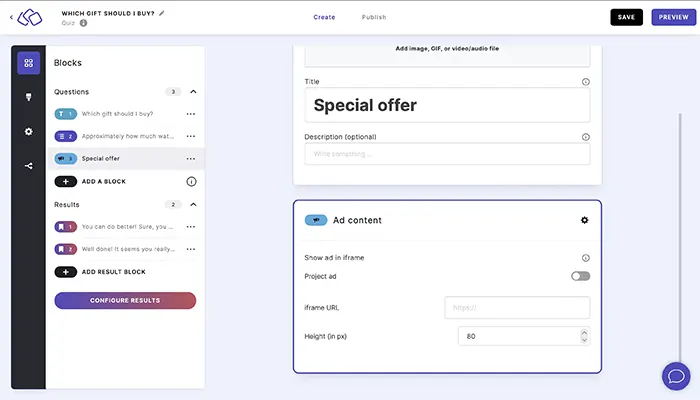
Riddle’s ad block lets you drop an ad into your quiz at any point – between questions, just before results, or anywhere else in the flow. It’s one of the most flexible placements available, because it sits inside the quiz where readers are already paying attention.
To add one:
- In the Create step, click Add a block and select Ad/iFrame from the block menu.
- You can choose 2 options for ads:
- Choose iFrame as your ad source and paste in the URL where Riddle can find the iFrame code.
- Or, programmatically serve ads from your ad server (see below)
- Make sure the URL starts with https:// – otherwise it won’t load.
- Optionally, set a fixed height (in pixels) so the ad displays cleanly across all devices.
That’s it – the ad block is now part of your quiz flow and will show to every reader who passes through it.
Monetize quizzes: using ad tags from your ad server
Are you serving your ads from Google Ad Manager, Doubleclick, or another ad server? We recommend this option to monetize quizzes if they provide you with an ad tag that you can run inside an iFrame.
- Go to your project settings and select the “ad slots” tab to insert your own ad code.
- Use variables for additional flexibility delivering ads to different audience groups.
- To use variables in your ad tag, add them in curly braces {}.
- Make sure to assign default values to each variable as shown in the example below.
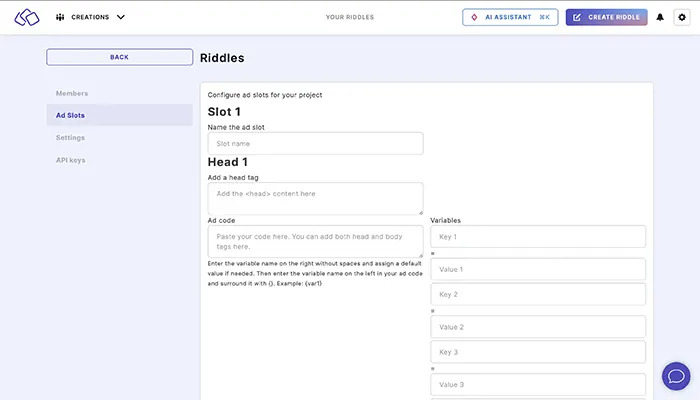
You can create up to 5 different ad slots per project. Once these are created, the creator can select an ad slot in the settings screen to add this ad unit to the Riddle (just like the iFrame option above).
Creators can also overwrite the default values for the variables, giving you unlimited flexibility for your ad serving – perfect for targeting different audience segments, content categories, or campaigns from a single project setup.
A few practical notes:
- Your ad tag needs to be responsive, as the Riddle unit itself is responsive. Alternatively, make sure you can serve ads for each mobile breakpoint.
- Test your ad tag in a draft Riddle before publishing – it’s the fastest way to catch any sizing or rendering issues.
- If you’re working with a managed ad ops team, the variable system means you can hand them a single template and let them control campaigns without touching the Riddle itself.
This feature is available to subscribers on our Enterprise plan (you can see our pricing and features here).
Stacking your in-quiz ad placements
The publishers getting the most out of Riddle don’t pick one ad placement – they layer them.
A typical high-performing setup might combine a banner ad above the quiz, refresh ads that update every two questions, and a video ad before the results screen. That’s three ad slots running off a single quiz, with each placement catching readers at a different point in their journey.
Add the multiplier effect of social sharing – quiz results travel well, pulling new readers back to your site – and you’ve turned a single piece of interactive content into a serious ad inventory unit.
Other monetization options
Beyond in-quiz ads, Riddle also supports lead generation (with 32.83% average opt-in rates), call-to-action buttons in results, and sponsored content opportunities. We cover those in detail in other posts on the blog – this article focuses on the in-quiz ad options above.
Get the full Riddle Monetization Playbook (free PDF)
Download the complete playbook on monetizing interactive content – covering ad serving, page ad refresh, first-party data, lead gen, and sponsored activations, with the 20min.ch case study showing a 20% lift in CPMs for ads placed inside a Riddle vs. comparable placements outside quizzes.
Any questions?
Just let us know how we can help. Our entire team helps out with support – from founders to product and devs.
That means you’ll get fast – and very good – customer support. Check out our stellar Capterra and G2 reviews – nearly every review mentions how happy they were with Riddle’s support.
If you have any questions about monetizing your Riddles or our in-quiz ad options, please ask us on support chat or reach out to hello@riddle.com.
Can I use my existing ad server with Riddle?
Yes – Riddle works with Google Ad Manager, Doubleclick, and any other ad server that provides an ad tag you can run inside an iFrame. Just paste your ad tag into the project’s ads tab, and your existing line items will serve into Riddle placements exactly as they do for the rest of your inventory. No new ad products or creative changes needed.Does Riddle take a cut of the ad revenue?
Does Riddle take a cut of the ad revenue?
No. You serve your own ads through your own ad server and keep 100% of the revenue. Riddle never runs its own ads inside your quizzes – that’s a hard line for us, and it always will be.
Where can I place ads inside a Riddle quiz?
You’ve got several placement options: as a banner above or below the quiz, as a dedicated ad block between questions, or as a full-attention interstitial right before the results screen. The interstitial slot tends to perform best, since readers who’ve spent three to five minutes answering questions are highly motivated to watch a short ad to see their result.
Will the ads display properly on mobile devices?
They will, as long as your ad tag is responsive. Riddle’s quiz unit itself is fully responsive, so your ad creative needs to handle different screen sizes too. If you’re using fixed-size creatives, make sure you’ve got the right sizes for each mobile breakpoint – or use a responsive ad tag and let your ad server handle the sizing.
How many ad slots can I set up per project?
You can create up to 5 different ad slots per project. Each slot can use variables (in curly braces) that your creators can override on a per-Riddle basis – giving your team flexibility to target different audiences, content categories, or campaigns from a single project setup, without needing technical help.