Can you pass user data into a quiz and get the answers out in real time? Yes. Riddle, the quiz and poll maker, does it with two features: the data layer pushes data in, and JS Events send every interaction out while the user is still playing. Check out 15 examples any publisher, brand or agency can use immediately.
Third-party cookies are going away and AI search is hurting your traffic. Getting users to log in and building user profiles are safe ways to keep and grow your audience.
Why is pushing data into a Riddle important?
Riddle provides you with a data layer to allow your website to pass data into Riddle. You may already know how data layers work from Google Tag Manager. Riddle’s data layer works very similarly. Your site pushes information into the data layer and Riddle is able to pick it up, use it in real time and then pass the data back to you along with additional information from the Riddle.
Logged-in user information
The most common use case is passing data from logged-in users to a quiz, a sweepstakes, or a form. If you already know the user’s details, there is no need for a quiz taker to fill out yet another form. But you may also want to serve different content to users who are logged into your app or website. This could be a simple message like “Log in or create an account to play this game.”
You don’t even need to pass any personal info into Riddle; an anonymous user ID is enough to identify the user once you receive data back from your quiz or form.
Riddle’s branching logic allows you to serve different content to logged-in users vs. logged-out users. This works in apps and on websites and provides you with an easy gating solution for your Riddle content.
Imagine you are running a giveaway but only want logged-in users to participate to drive user registrations. Simply pass a data layer variable to Riddle with the logged-in status. Riddle can now show a page to enter the giveaway to logged-in users and a message to create an account or log in to everybody else. You can even place your login form inside the Riddle.
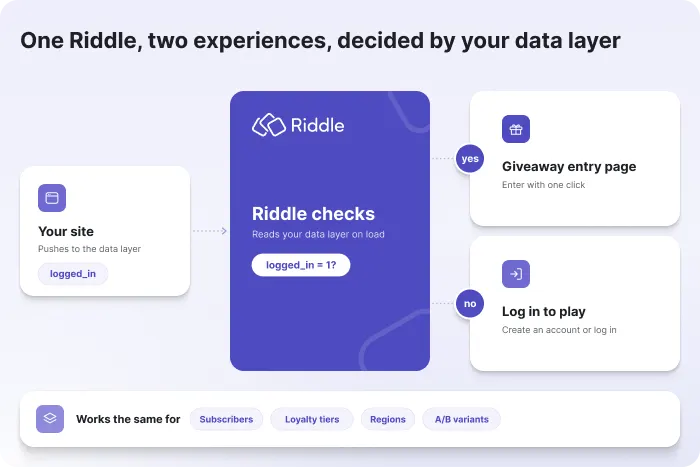
Here is all the code you need on the page where your Riddle is embedded. First add the keys (here user_id and logged_in) under Publish > Data layer in your Riddle, then push the values from your site. You will need Riddle’s Business plan or higher for this code to work (our free trials unlock every feature, so you can use the code in your existing free trial or start a new free trial if you want to run tests before upgrading):
window.riddleDataLayer = window.riddleDataLayer || [];
window.riddleDataLayer.push({ key: "user_id", value: "a1b2c3" });
window.riddleDataLayer.push({ key: "logged_in", value: "1" });
Subscriber vs. non-subscriber branching
Pass a paywall status to Riddle and only serve the Riddle content to paying users. Everybody else gets a “Subscribe now to unlock this content” message and a call-to-action button. Use this to offer a weekly news quiz with a leaderboard or a score prediction game with prizes for the best prediction only to subscribers.
Embed the first Riddle question into an email or a social post
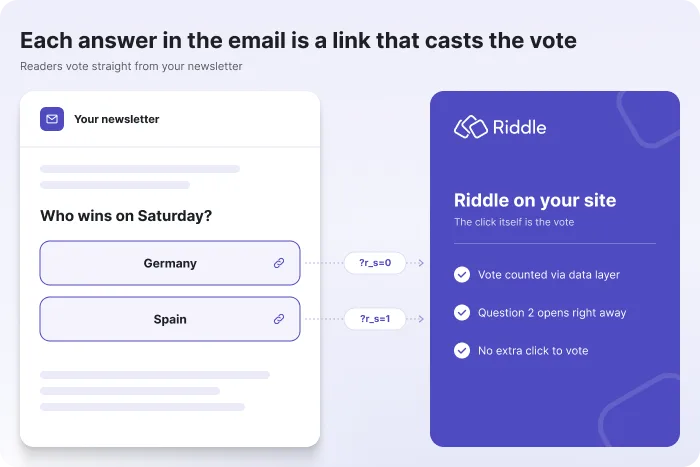
Using the data layer, you can embed the first question of a Riddle into a social post or an email. Each answer option gets its own link that opens the Riddle, submits a vote via the data layer and advances to question 2. Here is how to set it up and a live example.
Capture tracking links and UTM variables
If you want to measure how your different traffic sources perform, use Riddle’s data layer to capture UTM variables and URL parameters from your URL and store them with every user completing a Riddle. For example, if your URL looks like this: https://mysite.com?utm_source=googleads&utm_campaign=quizleads, we can store “googleads” and “quizleads” along with every quiz taker’s data. This is especially useful if you have a lead capture form in your Riddle. Along with the form data, you will see the exact campaign a user came from, and you can see if you get a good form completion rate from your campaigns.
Pass consent data to Riddle and to ads served inside Riddle
Riddle allows you to connect your ad server and serve dynamic ads inside the Riddle. If you use a Consent Management Platform (CMP) like OneTrust, Cookiebot or Usercentrics to get GDPR consent for your ads, you can pass that consent from your CMP to Google Ad Manager using our data layer. This also works with consent signals from the IAB Transparency and Consent Framework (TCF), the industry standard for ad consent in Europe. We have a full walk-through of how that works here: Data layer variables in project ad slots.
Dark mode or custom styling for the same Riddle
Pass a palette ID to the Riddle via the data layer and change the look and feel of your Riddles on the fly. If your site offers dark mode, pass the dark mode value to Riddle and change the palette to fit that mode (see the example).
You can also use the same Riddle on multiple sub-brands and change the look and feel of the Riddle with this feature.
More ways to personalize with the data layer
Loyalty tier or favorite team
Pass a profile attribute like loyalty status or a user’s favorite team to Riddle to show different questions or outcomes by combining our branching logic with your attributes.
Geo or age gating
Pass geo information or a user’s age to Riddle and only show the content to eligible users. Please keep in mind that this gating is only as good as the data passed to Riddle. If a user lies about their age or uses a VPN to fake a location, Riddle will not be able to stop the misuse.
A/B testing
Pass the test variant ID from Optimizely, VWO or your own testing setup and segment leads and events by variant.
Please note that our data layer feature requires our Business plan or higher.
Getting data out of Riddle at runtime
Riddle offers the typical methods of extracting data, from webhooks to our API endpoints or simple CSV exports. But all these data extraction methods require a user to finish the interactive experience.
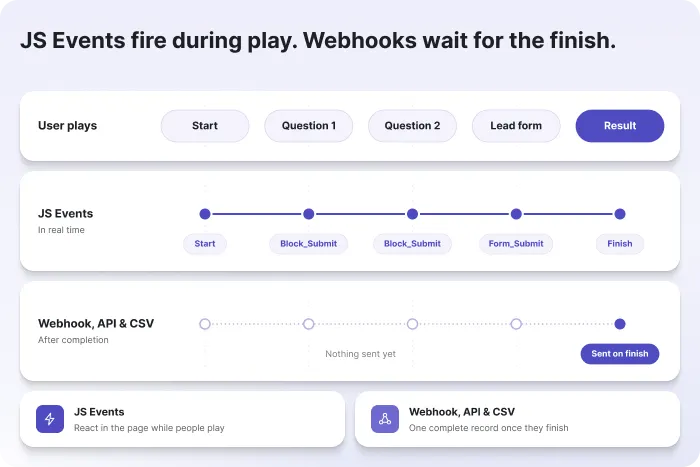
To get data at runtime, use our JS Events. These JS Events let you capture everything a user does in real time while the quiz is running. Capture answer selections, form submissions, skips, and many more events and process them in real time on your website.
Here is a list of all the events you can capture.
Listening to these events takes just a few lines of JavaScript on the page where your Riddle is embedded:
window.addEventListener("message", function (event) {
  if (!event.data || !event.data.isRiddle2Event) return;

  if (event.data.action === "Block_Submit") {
    // the question, the answer and your data layer values (e.g. user_id)
    console.log(event.data.blockTitle, event.data.answer, event.data.riddleDataLayer);
  }
});
What can you do with these events?
Here is a list of real-world use cases using JS Events to trigger actions on your website:
Update Data Management Platforms (DMPs) like Permutive
Data management platforms are used to build anonymous audiences on your website. These can be used to serve more relevant ads or influence which features a group of users gets shown. Collecting data for a DMP is challenging from surfing behavior alone. Users completing a quiz, a poll or a personality test provide very detailed information, allowing you to feed your DMP with highly relevant data. This can happen in real time using Riddle’s JS Events.
Imagine a user answering a question about vacation preferences with ocean over mountains. That answer can trigger your DMP and lead to your ad server serving a beach-vacation-related ad while the quiz is still running. Fire these triggers only after you have received user consent in your CMP.
Ad refreshes
In line with updating your DMP, a quiz event like advancing to the next block can also be used to refresh ads outside the Riddle unit with a custom JS Event and a message to the ad server. Because every refresh is triggered by a user action, like moving on to the next question, this fits the refresh policies of ad servers such as Google Ad Manager. Just make sure to declare the refreshing inventory in your ad server. We have working examples for ad refreshes outside the Riddle and inside the Riddle.
Zero-party data into the user profile
Zero-party data is information users share with you voluntarily, and quiz answers are exactly that. Use our JS Events to pick up the answers of logged-in users together with their user ID and pass them to your CRM (Brevo, Salesforce, Mailchimp, ActiveCampaign, etc.) with a few lines of your own code. If you prefer no code, the same data reaches your CRM via our webhook or built-in integrations once the user completes the Riddle. Newsletter or information preferences nobody fills out can now be filled by users answering questions in a quiz or personality test they love to take.
Unlock content on completion
Use the finish event of a Riddle to reveal the rest of an article, show a coupon code or enable a download on the host page. Let the user earn the reward rather than pay for it. A related pattern is to redirect users based on their answer.
Custom trackers and pixels
Another, less common use case is to track events like form submissions in a custom tracking tool. If you run campaigns to get users to fill out a form, you can use our events to track form submissions in real time, update your campaign setup and improve performance. We have one-click setups for the most common tracking tools like Google Analytics, Google Tag Manager, Meta or Matomo, but if you want to set up your own custom tracker, we give you this option with our custom tracking event function.
You can also fire custom pixels for TikTok, LinkedIn, Reddit or Pinterest conversion events on form submissions or skips and optimize campaigns for leads, not clicks.
Custom calculations for Riddle results
Some of our customers use predefined scientific models, like a health risk score or an insurance estimate, to calculate Riddle results. These models are extremely complex and go far beyond what standard quiz scoring can do. If the model provides access to an API (a way for Riddle to talk to the scoring model), you can use our events to first collect all the users’ answers and then send them to the scoring model for calculation. Once you get the result back, use the Riddle data layer to feed that result back into Riddle for display on the result page.
We have a very simple example of running a calculator this way here: Riddle calculator example.
Putting it all together: the data round trip
The real power comes from combining both features. Every value you push into the Riddle data layer is attached to the JS Events the Riddle sends back. Push an anonymous user ID in when the Riddle loads, and every answer, skip and form submission comes back out already tagged with that ID. No matching, no extra form, no guessing who answered what. Data layer values travel with your tracking events by default, and you can switch this off per tracking tool in its custom event configuration.
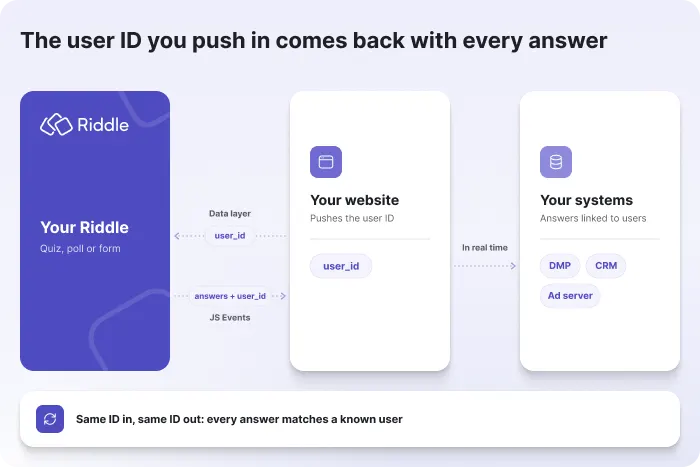
Here is what that looks like in practice: a logged-in reader opens a travel quiz, and your site pushes their user ID into the data layer. The reader picks “ocean” over “mountains”, and the Block_Submit event arrives on your page with the answer and the user ID. Your site sends both to your DMP and CRM, your ad server shows a beach ad on the next block, and the reader’s profile now says “prefers beach vacations”, all without them ever filling out a preference form.
Data in, data out, one user, in real time.
FAQ: the Riddle data layer and JS Events
What is the Riddle data layer?
The Riddle data layer is a way to pass values from your website or app into a Riddle, such as a user ID, a login status, a campaign ID or a color palette. You can fill it with URL parameters (no code needed) or with JavaScript. Every value is saved with the lead and sent along with your tracking events.
What are Riddle JS Events?
Riddle JS Events are JavaScript messages a Riddle sends to the page it is embedded on while someone plays it. They cover views, starts, finishes, answers, form submissions, skips, call-to-action clicks and social shares, so you can react to user behavior in real time. The full list is in the Riddle help center under Tracking, JS Events.
Do I need a developer to use the data layer and JS Events?
Not always. Passing campaign IDs or other values via URL parameters works without any code, and Riddle’s built-in integrations for Google Analytics, Google Tag Manager, Meta Pixel, Matomo and Adobe Analytics need no code either. Pushing data with JavaScript or reacting to JS Events on your own site takes a few lines of code, as shown in the examples above.
Which Riddle plan do I need for the data layer?
The Riddle data layer is available on the Business plan and higher. Riddle’s free trial unlocks every feature, so you can test the data layer and JS Events before upgrading.
Can I get Riddle data before a user finishes the quiz?
Yes. Webhooks, the Riddle API and CSV exports deliver data once a user completes the Riddle, but JS Events fire in real time with every interaction. That lets you act on an answer while the quiz is still running, for example to update a DMP or refresh an ad.
Do I have to pass personal data into a Riddle?
No. An anonymous user ID is enough to connect Riddle data with your own user records later, so names and email addresses can stay in your own systems. For ads and DMP triggers, pass your CMP’s consent status via the data layer and only fire tracking once the user has given consent.
Does the Riddle data layer work in mobile apps?
Yes. You can embed Riddles in native and cross-platform apps, such as iOS or Flutter apps, and use the data layer there, for example to show different content to logged-in app users.
Does the Riddle data layer work with Google Tag Manager?
Yes. Riddle sends its events to Google Tag Manager with a one-click setup, and your data layer values are included with every event. That means you can build GTM triggers on answers or form submissions that already carry your own user ID.