

The best-performing websites only show content that is relevant to the individual visitor. By personalizing content, you can remove distractions and increase conversions. Take Amazon, for example.
If you have never searched for pet supplies, Amazon knows that you most likely don’t own pets and will not serve any pet food on their homepage for you. This personalization goes mostly unnoticed, but it is a powerful sales driver for them.
Personalization is a bit more challenging if you don’t have a purchase history from your users. Using Riddle’s quiz maker to create quizzes and personality tests is a powerful way to learn more about your users’ preferences. The data you collect is zero-party, so you can freely use it for personalization.
Step 1? Include questions in your Riddles that unlock answers to the most useful personalization for your business. If you run a travel website, knowing if someone prefers vacations in the mountains is a powerful data point.
You can use our event system to push data from the Riddle iFrame to the surrounding website, where you can use that information to create custom content or set cookies. Check out this example where the answer option you choose changes the text in an advertising banner on the website.
You can also use our event system to push data into Google Tag Manager, Google Analytics, or any other tracking tool with our custom event setup.
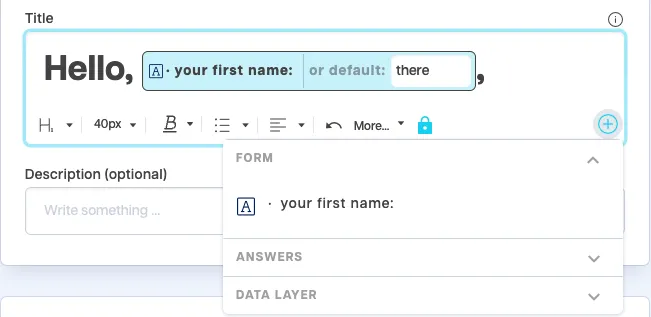
Here are four examples of how using our events can enhance your content:
1. Dynamic banner updates based on quiz responses
When a user answers a quiz question, you can immediately adjust banner content based on their choice. For example, if a user on a travel site selects “mountains” over “beach” in a preferences quiz, a banner at the top of the page can display mountain vacation packages. This creates a seamless, personalized experience without having to refresh the page.
2. Setting cookies for future content personalization
By leveraging the onComplete event after a user completes a quiz, you can set a cookie reflecting their preferences, which can be referenced in future visits. For instance, a cooking blog might set a cookie if a user selects “vegetarian” in a dietary quiz. On subsequent visits, the site could prioritize showing vegetarian recipes, creating an ongoing personalized experience.
3. Content personalization with a Google Tag Manager integration
Pushing quiz data to Google Tag Manager allows you to create custom content or retargeting strategies within Google Analytics. For example, a quiz response indicating interest in outdoor activities could be used to prioritize similar content across the website for that user or to create a tailored ad audience, boosting conversion rates through targeted advertising.
4. Adaptive product recommendations in real time
Use Riddle’s onResponse event to instantly modify product recommendations on your page based on quiz answers. For instance, on an e-commerce fashion site, if a user selects “casual” over “formal” style in a quiz, the product carousel can dynamically switch to show casual clothing items. This allows you to align product suggestions with the user’s preferences, increasing the likelihood of conversion.
Conclusion
Quizzes are one of the best sources of zero-party data. Quiz-takers usually answer questions honestly and out of personal interest, making them a perfect data source for personalization. Using Riddle’s JavaScript events, you can personalize your content in real-time or store personalization information in a cookie for ongoing use. Integrating this data into your website experience using Riddle events transforms generic content into a customized journey, increasing user engagement, driving conversions, and fostering long-term loyalty.
Whether you’re adjusting banners, tailoring product recommendations, or setting cookies for future personalization, Riddle events open endless possibilities to make each user interaction meaningful and relevant. Start experimenting with Riddle’s event system to see how personalized content can elevate your site experience and keep users returning for more.
Further reading
Adobe highlights that personalized content is crucial for attracting and retaining customers.
Zendesk outlines the critical role of personalization in enhancing customer experiences and satisfaction.
Frequently asked questions
How can I personalize website content with a quiz?
Collect a visitor’s preferences as zero-party data through a quiz or personality test, then use Riddle’s event system to push that data to the surrounding page so you can tailor content or set cookies, even without any prior purchase history.
What is Riddle’s event system?
It pushes data from the Riddle iframe out to the host website and to tools like Google Tag Manager and Google Analytics, so a quiz answer can trigger dynamic changes on your page or feed your analytics and retargeting.
Can a quiz answer change my page content in real time?
Yes. For example, if a user on a travel site picks mountains over beach, a banner can immediately switch to mountain vacation packages, creating a seamless personalized experience with no page refresh.
How do I personalize repeat visits based on a quiz?
Use the onComplete event to set a cookie reflecting a user’s choice, such as vegetarian on a cooking site, then prioritize matching content on their future visits for an ongoing personalized experience.
Can quiz data feed Google Analytics or Tag Manager?
Yes. You can push quiz responses into Google Tag Manager or Google Analytics with Riddle’s custom events, then use them for tailored content, segmentation, and retargeting strategies.